On this page
- Why AI is bad at memes
- What you need
- The one-prompt version
- How it works under the hood
- Anatomy of a post that works
- Examples: match the story to the template
- Scooby-Doo Reveal: “it looked like X, but it was actually Y”
- Ah Shit, Here We Go Again: the same bad thing happened again
- Drake: the version people expect vs the version that happened
- Panik Kalm Panik: good news with a twist
- Trade Offer: a deal that’s obviously one-sided
- Tips to make the memes actually funny
- What’s next
A while ago I started a new faceless account on Threads. Zero followers. In 30 days it got almost 300K views. I haven’t told anyone which account it is, and I’m not going to here either, sorry, hehe.
An AI agent does everything: it finds the topics, writes the posts, publishes them, and even reads the analytics.
The surprise was what made it work. It wasn’t AI slop video. It was memes.
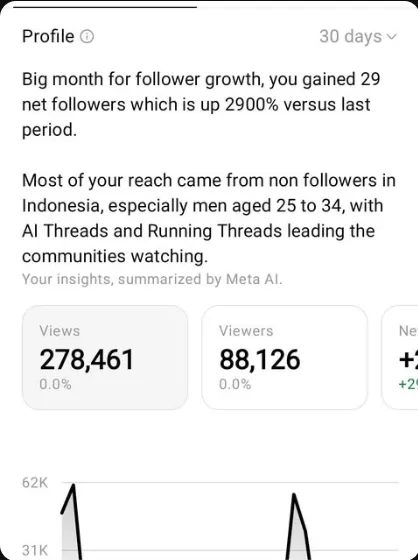
This article is only about the meme part: how to get AI to make memes that are actually good. The full social media automation (finding topics, publishing, reading analytics) gets its own article later.
Want the full social media automation article?
It's coming next. Leave your email and you'll get it first. Free, no spam.
You're on the list.
Why AI is bad at memes
If you ask a model like Opus 5.5 to make a meme from scratch, it tends to invent its own illustration. A made-up picture with a made-up joke. It’s cringe.
A meme works because people recognize the template instantly. Everyone already knows what Drake waving his hand away means, so the joke lands in half a second. A brand new drawing has no such shortcut.
But give the same model a template library and it gets really good at this. So I built memegenscript.com, a meme generator made for AI agents. It has more than 500 templates, it’s free, and there’s no API key or signup. Every meme is just a URL.

What you need
- An AI agent that can browse the web. Claude Desktop with Claude Pro is enough, same as in my shorts explainer tutorial. Claude Code, Codex or other agents work too.
- Your logo, if you want your brand on the memes. Optional.
Memegenscript itself is free.
The one-prompt version
You don’t need a long prompt. Something as simple as this works:
Replace YOUR_TOPIC with anything: a news link, a paragraph you copied, or your own opinion. Attach your logo file to the chat.
To test it, I gave Claude a topic everyone in an office can relate to: companies forcing people back to the office 5 days a week while the commute keeps getting worse. Here’s what it made on the first try:

And the post text it wrote to go with it:
The 5-day RTO plan, as explained by leadership 👇
Step 1: Mandate everyone back to the office 5 days a week
Step 2: Sit in traffic 3 hours a day to “collaborate”
Step 3: Spend the whole day on Zoom with people in another city
Step 4: …waitIf the job can be done from a laptop, maybe the commute is the meeting that should’ve been an email.
How long is your commute now? 🚗⏳
It picked a template where the joke fits: Gru’s plan is about a plan that looks fine until the last step. Not bad for one prompt. I would delete the hashtags it added at the end, though.
What happened behind the scenes: Claude opened memegenscript.com, found the guide written for AI agents, searched the templates, read what each one means, wrote the text, and downloaded the finished image.
How it works under the hood
You don’t need to know this part, since your agent handles it. But it helps when you want to fix something.
Every meme on Memegenscript is a URL. The text goes in the path:
https://memegenscript.com/images/drake/asking_ai_to_draw_a_meme_from_scratch/giving_ai_500+_meme_templates.pngOpen that link and you get the image. Your agent does three things:
- Search for a template by describing the situation, for example
https://memegenscript.com/templates?q=regret. Each result says what the meme means and which text goes where. - Create the meme by sending the template and the text, which returns the image URL.
- Post the URL, or download the image and upload it.
That’s why AI is good at it: picking a template from a list and writing two short lines is exactly the kind of thing language models are great at. Drawing a funny picture is not.
Anatomy of a post that works
Here’s the best-performing post so far (the account name is blurred). The account was only a few weeks old, and this thread got 57.4K views and 249 likes.
The news: PDIP pushed the House of Representatives (DPR) to launch an inquiry (hak angket) after the Constitutional Court found no proof that the Vice President has a high school-equivalent diploma.

Every post on the account follows the same structure:
- The first post tells the news in two or three sentences, adds one number we calculated ourselves (“an inquiry needs 291 votes if 580 members attend; PDIP has 110 seats, 181 short”), and ends with a question so people reply. The meme goes here.
- The first reply lists the numbers as bullet points: the legal requirements and the seats per party.
- The next replies add context (what the other parties said) and the source links.
Look at the meme: Gru’s Plan, the same template Claude picked in the test above. The plan looks great until the last panel, when Gru reads “PDIP: 110 seats” a second time and realizes it isn’t 291. The joke is the number.
The meme isn’t the content. It’s the hook. The facts are in the text, and the meme makes people stop scrolling and read them.
Examples: match the story to the template
The trick is picking a template whose structure matches the story. These are all from the faceless account (in Indonesian, with the translation below each one), recreated with Memegenscript so you can see the template on its own.
Scooby-Doo Reveal: “it looked like X, but it was actually Y”

Ah Shit, Here We Go Again: the same bad thing happened again

Drake: the version people expect vs the version that happened


Panik Kalm Panik: good news with a twist

Trade Offer: a deal that’s obviously one-sided

You don’t have to memorize any of these. Your agent searches the templates by situation. But knowing the pattern helps you judge whether the meme it picked actually fits.
Tips to make the memes actually funny
Use Opus 5.5. Everything in this article was made with Opus 5.5. Picking a template that actually fits the story takes taste, so use the strongest model you have. In Claude Desktop you pick it at the bottom right of the chat.
Give context, not jokes. Paste the whole news story, or tell the AI your angle. Let it pick the template and write the text. When I write the joke myself, it’s usually worse, hehe.
Ask for options. “Give me 3 meme options with different templates” and then pick one. It costs nothing, and the second or third option is often the best.
Check which text goes where. Some templates have more slots than you’d think. Scooby-Doo Reveal has four: two for the labels on the characters, and two for the captions under each panel. Put the text in the wrong slots and it comes out tiny:

Keep the text short. Under about 60 characters per line. Numbers hit harder than adjectives: “8 million pills a day” beats “a huge drug factory”.
Add your brand. Tell Claude to put your logo in a thin bar under the meme, so the meme itself stays clean. When people screenshot and share it, your name goes with it.

What’s next
This is one piece of the automation. In the next article I’ll show the whole thing: how the agent finds topics every day, writes the post and the replies, publishes to Threads, and reads the analytics to learn what works.
In the meantime, try making a meme about something you care about, post it and tag me: @terrydjony on Threads, @Terry_Djony on X, or @terrydjony on Instagram. I want to see what your agent comes up with.
Missing a template? Request it here.
Was this useful?
Thanks, good to know.Got it, thank you.Something went wrong. Please try again.
Got a question or stuck somewhere? Email me at [email protected] or DM me on Threads. I answer every one.
Share this tutorial:
Get the members-only posts
Members get the members-only tutorials and courses, like my AI Coworker on Discord course, and every new tutorial first. Free, no spam.
You're on the list.
What should I write next?
Finished this one? Tell me what you are stuck on next. The next tutorials come from these answers, and I reply to yours when it turns into one.
Got it, thank you. I read every one.
You wrote: